


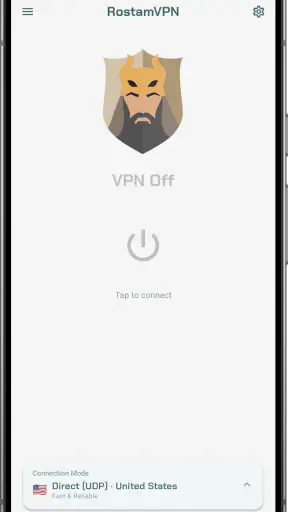
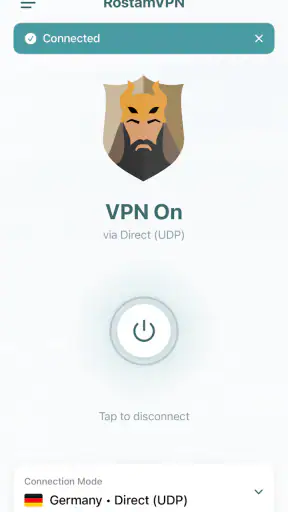
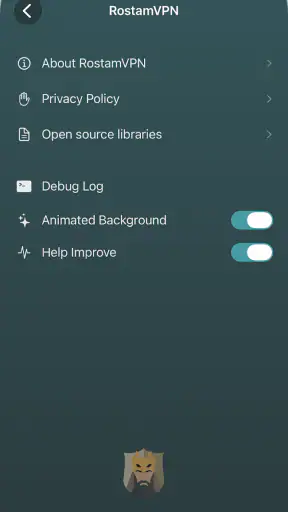
I came away from RostamVPN: Fast & Secure VPN with a fairly clear impression: it is a straightforward communication app for people who want a free VPN connection without having to manage a long list of settings. Its appeal is less about turning privacy into a technical project and more about making a connection available when a network is unreliable, restricted, or simply not trustworthy enough for everyday browsing.
That simplicity is its strongest quality, but it also defines the limits of the experience. I would recommend it to someone who wants a practical VPN utility for ordinary use on Android, especially when moving between home Wi-Fi, public networks, and mobile data. I would be more cautious about recommending it as the only privacy tool for sensitive professional work, because a VPN alone does not make every online activity anonymous or secure.
What using RostamVPN feels like in daily life
The app comes from Red Team LTD and sits in the communication category rather than presenting itself as a complicated security suite. It is free, aimed at Everyone, and supports Android devices running version 6.0 or later. That broad compatibility matters if you keep an older phone as a backup or use a budget handset that no longer receives the newest Android releases.
In practical terms, I see the app as a connection switch rather than a service that demands constant attention. The store summary describes a VPN that adapts automatically across networks and does not impose usage limits. That combination is useful for people who do not want to choose a protocol, tune a server, or remember to change settings each time they leave home.
A realistic example is using a café network while checking email, reading messages, or handling a routine account. I would open the app before doing anything important, establish the VPN connection, and then continue normally. When leaving the café, I would disconnect or let the connection change with the network rather than treating the app as something that needs to remain active every minute of the day.
That workflow also highlights a small but important habit: I would not assume that the VPN automatically protects an app that was already connected before the tunnel started. After connecting, I would close and reopen any especially sensitive service, then check that its connection behaves normally. This is not a special RostamVPN feature; it is a sensible way to avoid relying on stale connections when changing network conditions.
Where the automatic approach helps most
The automatic behavior is particularly convenient for people who move between networks frequently. A commuter might begin a journey on home Wi-Fi, switch to mobile data, and later use a public hotspot. A manual VPN can become annoying in that situation because every transition creates another decision. RostamVPN’s hands-off approach is better suited to users who value continuity over detailed control.
I also found the no-limit positioning relevant for ordinary browsing habits. Free VPN tools often make users think about how much data they have left or whether a short video, download, or software update will consume an allowance. With this app, the intended experience is less restrictive. Still, “no limits” should not be confused with unlimited speed. The actual quality of a VPN connection can vary with the network, distance to the service, congestion, and the websites or apps being used.
One useful way to judge the app is to separate connection availability from connection performance. If the VPN connects when another network is awkward or blocked, it has already solved one problem. If a video call becomes unstable or a large file takes noticeably longer, that is a different trade-off. I would keep the app available for protection on uncertain networks, but I would not insist on leaving it active during every bandwidth-heavy task.
The app has reached more than a million installs, with an average rating of 4.1 from roughly fifteen thousand ratings and about a thousand written reviews. Those figures suggest that it has found a substantial audience, while the rating also leaves room for mixed experiences. I read that combination as a reason to approach it as a useful everyday tool rather than an automatic guarantee that every device and network will behave identically.
What the current version means for older devices
The current version is 6.4.3-nowruz. For someone already using the app, checking that version before troubleshooting is worthwhile. A connection problem may come from the network itself, but it can also be related to an outdated installation. Updating first is a simple step before changing phone settings or blaming the VPN.
The Android requirement beginning with version 6.0 is another practical advantage. It makes RostamVPN accessible on phones that are not eligible for many newer applications. At the same time, older Android hardware may have weaker processors, less memory, or less efficient battery management. If the phone becomes warm or the battery drops faster while the VPN remains active, I would use it only when the network situation justifies it rather than keeping it connected all day.
That is one of the less obvious trade-offs with a free VPN on an older phone: compatibility does not guarantee an identical experience across devices. A modern handset may handle background networking smoothly, while an older model may pause or restrict the app. If automatic behavior seems inconsistent, I would check the phone’s battery-saving and background-activity controls before concluding that the service itself is unusable.
Privacy is useful, but it is not a magic shield
A VPN can help create a more private route between a device and the online service it is contacting, especially on a network shared with strangers. That makes RostamVPN relevant for public Wi-Fi and unfamiliar connections. However, I would still use strong passwords, two-step verification where available, and caution with suspicious messages. A VPN does not stop phishing, does not verify that a website is genuine, and does not make a careless download safe.
I would also avoid describing any VPN as a promise of total anonymity. The app can change how traffic travels, but websites may still recognize an account, a browser session, or other signals. If I log into the same social network or shopping account, that service can still know it is me. The sensible benefit here is an additional layer for network privacy, not invisibility.
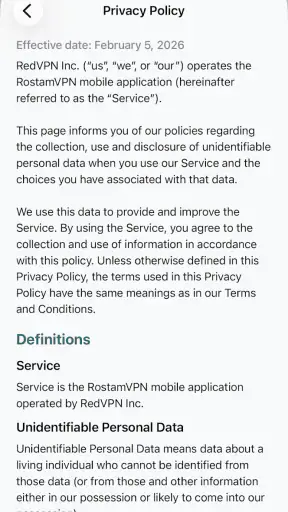
For sensitive work, I would compare the app’s convenience with the requirements of the situation. Someone handling confidential business documents, managing company systems, or needing clearly documented privacy practices may prefer a paid provider with more visible controls and support. RostamVPN is easier to approach, but ease of use should not be mistaken for a complete security policy.
The friction I would want new users to expect
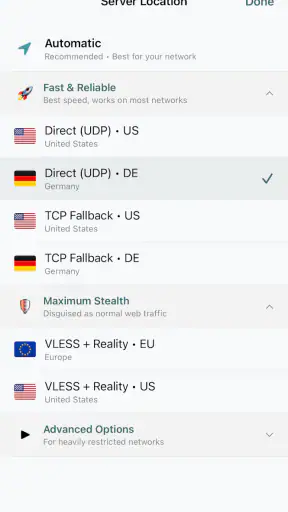
The biggest weakness is the lack of detail that comes with a deliberately simple VPN experience. Users who want to select among many locations, inspect technical connection information, or fine-tune how individual apps use the tunnel may find the app less satisfying than a more advanced alternative. The automatic design removes decisions, but it also removes some opportunities for control.
That matters when a website behaves differently after the VPN is enabled. Banking services, streaming platforms, games, and work portals may react to a changed network path. If one of them refuses to load, I would disconnect RostamVPN temporarily to identify whether the VPN is involved, then reconnect afterward. This is a practical diagnostic routine, but it can be inconvenient if I need the protected connection and the blocked service at the same time.
Another limitation is that “works on any network” is best understood as an aim of the service, not a guarantee that every network will permit a VPN connection. Some workplaces, schools, hotels, or public hotspots restrict VPN traffic. A service can adapt automatically only within the limits imposed by the network around it. When a connection fails, I would test mobile data or another trusted network before spending time repeatedly tapping the connect button.
Speed is also something I would judge by task. For reading, messaging, maps, and ordinary account access, a small slowdown may be unimportant. For competitive online games, high-quality video calls, cloud backups, or large downloads, even a modest change can become irritating. In those cases, I would connect only when privacy matters more than latency, and disconnect when the performance cost affects the task.
Who should choose it, and who should look elsewhere
RostamVPN is a good fit for a first-time VPN user who wants a free option with an uncomplicated routine. It also makes sense for someone with an older compatible Android phone, a traveler who regularly uses unfamiliar networks, or a user who dislikes monthly subscriptions. The Everyone age rating and simple communication-focused purpose make it approachable for general household use, provided each person understands what a VPN can and cannot do.
I would especially consider it for occasional public-network protection. If I spend most of my time on a trusted home connection but sometimes work from cafés, libraries, hotels, or transport hubs, a free app that I can activate when needed is more sensible than paying for features I rarely use. The no-limit positioning also makes it more practical than a trial-style VPN that becomes unusable after a small amount of traffic.
I would skip it if my main requirement were advanced location control, detailed diagnostics, or a clearly managed business-grade setup. I would also look at alternatives if streaming access, gaming latency, or a large choice of server locations mattered more to me than simplicity. A paid VPN may be the better option for someone who wants stronger support, more transparent controls, or a wider range of specialized tools.
There is another audience that should be careful: people who believe installing a VPN removes the need for basic online judgment. I would not recommend any VPN as a substitute for updates, secure account settings, malware protection, or checking website addresses. RostamVPN can be one layer in a safer routine, but it should not carry the entire responsibility.
A practical setup routine I would use
My preferred routine would be deliberately simple. I would install the current version on a supported Android device, connect before using an unfamiliar network, and test a few everyday services that matter to me. I would then note whether messaging, browsing, email, and any essential work app behave normally. Testing these services early is better than discovering a compatibility problem during an urgent task.
If the connection feels slow, I would first compare the same activity with the VPN disconnected, then try a different network. That quick comparison helps separate a RostamVPN issue from a weak hotspot or congested mobile signal. I would avoid changing several phone settings at once, because that makes it harder to identify what actually solved the problem.
For battery-conscious use, I would not leave the VPN running simply because it is available. I would activate it when joining an unfamiliar network or handling traffic that benefits from an extra privacy layer. After returning to a trusted connection, I would decide whether continuous protection is worth the background activity for my particular phone.
I would also keep expectations realistic when using location-sensitive services. If a website shows different content, asks for another verification step, or stops working, that may be a normal reaction to the VPN route. Rather than repeatedly retrying, I would disconnect, complete the necessary task, and reconnect afterward. This makes the app less frustrating in real life.
My final view is positive but measured. RostamVPN is most convincing as a free, low-friction VPN for everyday Android use, particularly when I need a quick layer of protection on an unfamiliar network and do not want to learn technical settings. Its automatic approach, broad device compatibility, and no-limit positioning make it easy to recommend to casual users.
At the same time, I would not choose it for every situation. Users who need deep configuration, predictable performance for demanding activities, or a more formal privacy solution should compare it with established paid alternatives. For everyone else, the app offers a sensible starting point: connect when the network deserves less trust, test the services you rely on, and remember that privacy tools work best alongside careful online habits.
With over a million installs and a 4.1 average, it has clearly become a familiar option for many Android users. My recommendation is to treat that popularity as an invitation to try it, not as a reason to ignore its trade-offs. If your priority is uncomplicated, free VPN access on a compatible phone, RostamVPN: Fast & Secure VPN is worth considering.


